
August 30, 2026
Published:
15 min Read
How to Digitally Transform Equipment Rental Operations

Co-Founder & CTO | Rosnium
IN THIS ARTICLE
This guide (blueprint) helps operations decision-makers recognise that buying a rental system is not the same as building a rental operating model. We explain what to look for in high-value rental management software, which capabilities matter, and how to move from reactive exception-chasing to a proactive, data-driven rhythm where the right person has accurate information, authority and a clear next action before the issue affects the customer or the P&L.
Introduction
A standard rental management system (RMS) can record bookings and manage inventory. But a higher-value rental operating system goes further: it keeps the customer, contract, asset, availability, service status, delivery, off-hire and invoice connected throughout the rental lifecycle.
That distinction matters as renting has become a more important way for businesses to access and deploy high-value equipment. McKinsey & Company reports that the North American equipment rental market is expected to reach USD $100 billion by 2026 growing from approximately USD $41 billion in 2013, reflecting a structural shift in how machinery is booked, accessed, and deployed.
At the same time, the European Rental Association (ERA) identifies real-time asset information, end-to-end digital rental processes, customer engagement and data-enabled services as central parts of the industry's digital transformation.
Forward-thinking business owners and technology decision-makers are therefore reassessing whether one-size-fits-all platforms can support their operating models or whether purpose-built capabilities could turn inventory logistics into a competitive advantage.
Why Rental Operations Must Transform
Most equipment-rental companies already have "software" in place, but fewer have connected the systems that manage assets, inventory, contracts, utilisation and the customer journey end to end. You may have an ERP for finance and procurement, rental software for bookings and availability, and separate tools for transport, inspections or document management.
That is digitisation, but it is not automatically digital transformation.
Digitisation vs Digital Transformation
Digitisation moves an existing task from paper, telephone calls or spreadsheets into software. Digital transformation changes how information, decisions and work move across the organisation. It connects the journey from enquiry and quotation through reservation, allocation, preparation, dispatch, delivery, use, extension, off-hire, inspection, maintenance and invoicing.
A connected rental operation should be able to answer a deceptively simple question:
Can this asset be profitably supplied to this customer, on time, in a serviceable condition, under the correct contract, and invoiced without correction?
Value of Transformation
Rosnium’s own work with a camera rental client helped replace phone calls, spreadsheets and manual receipts with a cloud-native rental management platform that eliminated double bookings, improved asset utilisation and reduced audit and tax preparation time by up to 90%.
The wider rental industry shows similar potential. ERA digitisation case studies report improvements in revenue maximisation, cost optimisation, equipment turnaround, inspection time and billing accuracy as operators connect more of the rental lifecycle.
In practice, the value comes from connecting more of the rental lifecycle, not simply adding more software.
Where Rental Operations Break Down
In a fragmented operation, answering the simple question above require calls between branches, spreadsheet checks, messages to the workshop, a separate transport calendar and the judgement of an experienced employee who knows which records can be trusted.
The software exists, but people still reconcile the lifecycle manually.
Scenarios Where Margin and Trust Are Lost
An item appears available even though it is awaiting inspection, cleaning or repair.
A camera body is reserved without the required lens, battery, memory card or case.
A trailer is physically present but lacks a valid service or compliance record.
A customer keeps equipment beyond the agreed return time, creating a conflict with the next booking.
Transport, cleaning, fuel, damage or excess-usage charges are not captured.
A contract is extended operationally but the billing record is not updated.
Different systems hold conflicting customer, asset or pricing information.
Finance receives incomplete evidence and must correct or delay an invoice.
Customers repeatedly contact staff because they cannot see availability, delivery status or documentation.
These problems may be manageable when one operations manager or depot manager can hold the operation in their head. They become expensive as fleet size, branch count, contract complexity and transaction volume increase.
What Is a Rental Management System?
Rental management software is the operational layer that coordinates the rental transaction and the lifecycle of each rental asset.
In a straightforward operation, those capabilities may sit within a single software. In a larger or more specialised business, the rental management layer may instead require coordinating several systems (ERP, CRM, accounting, asset management and telematics systems) without explicitly replacing them.
It is essential to distinguish the core rental management layer from the systems around it, as those boundaries vary by sector and operating model. Ultimately, the software architecture should reflect the specific demands of the rental business model.
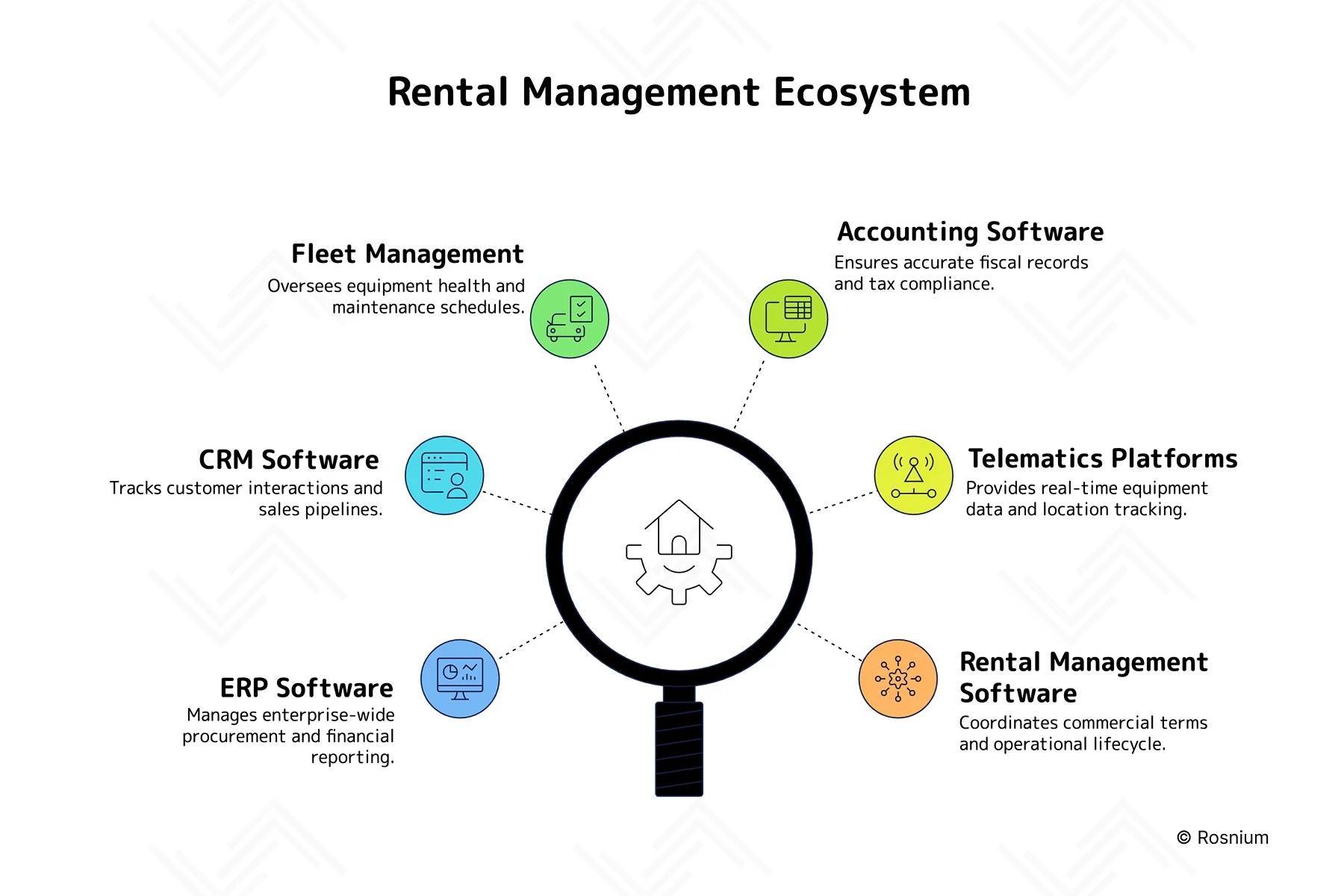
Figure 1: Rental Management Interconnected Ecosystem Overview
The Digital Transformation Guide
For an asset-intensive, multi-site business, an asset creates value; only when it is serviceable, correctly located, commercially available, allocated efficiently, delivered as promised, returned with the right evidence, and invoiced accurately. That value is created across the entire rental lifecycle.
The priority is not to give senior managers another dashboard. It is to ensure that the right person has current, accurate, and trusted information, with a clear next action before an exception turns into lost revenue, or a customer issue.
The RMS Blueprint:
This guide helps technology decision-makers recognise that buying a rental system is not the same as building a rental operating model. We explain what to look for in a high-value rental management software, which capabilities matter, and how to move from reactive exception-chasing to a proactive, data-driven rhythm.
1. Start with the Rental Lifecycle
Do not begin with a vendor feature comparison. Begin by mapping how your company actually rents and manages assets:
Enquiry → Quote → Reservation → Contract → Allocation → Preparation → Delivery → On-hire → Off-hire → Inspection → Maintenance → Invoice
For each stage, identify:
The team accountable for the decision.
The system containing the required data.
The manual handoff, spreadsheet, call, email, or paperwork still required.
The financial or customer consequence if that handoff fails.
This reveals the real transformation opportunities: assets incorrectly shown as available, incomplete off-hire records, workshop delays, missed transport charges, unrecovered damage, delayed invoices and managers reconciling multiple systems before they can act.
2. Design Around Asset Lifetime Value
The core measure is not the apparent margin on one rental invoice. It is the lifetime return per asset.
Your rental management software should help answer:
Where is this asset, and is it genuinely available?
Is it inspected, safe, serviceable, and commercially eligible?
How long has it been idle, on hire, in transit, or under repair?
What revenue, maintenance cost, transport cost, downtime, and recoverable charges has it generated?
What must happen next to return it to productive use?
This creates a repeatable asset flywheel:
Availability → Allocation → Utilisation → Off-hire → Inspection → Maintenance → Rental-ready → Next hire
The aim is to remove avoidable delay from this cycle. Faster, well-controlled turnaround improves availability; availability supports utilisation; utilisation improves return from the same capital base.
3. Build the Data Foundation Before AI
AI has a meaningful role in rental operations, but only after the workflow and data foundation are reliable. Before deploying AI, define the data it needs, the decision it improves, the operational owner who acts on it and the KPI that demonstrates value.
With structured, connected data, AI can support practical tasks:
Extracting details from emails, documents, and inspection notes.
Identifying missing information or potentially missed charges.
Flagging unusual usage, late-return risk, or contract exceptions.
Forecasting demand and underutilised fleet.
Prioritising assets for inspection or maintenance.
Predicting maintenance needs from service history and telematics.
ERA's 2025 AI report identifies 40 potential use cases for equipment rental, while placing data, governance, risk management and change adoption at the centre of scalable implementation. This aligns with the core considerations in Rosnium's approach to AI transformation.
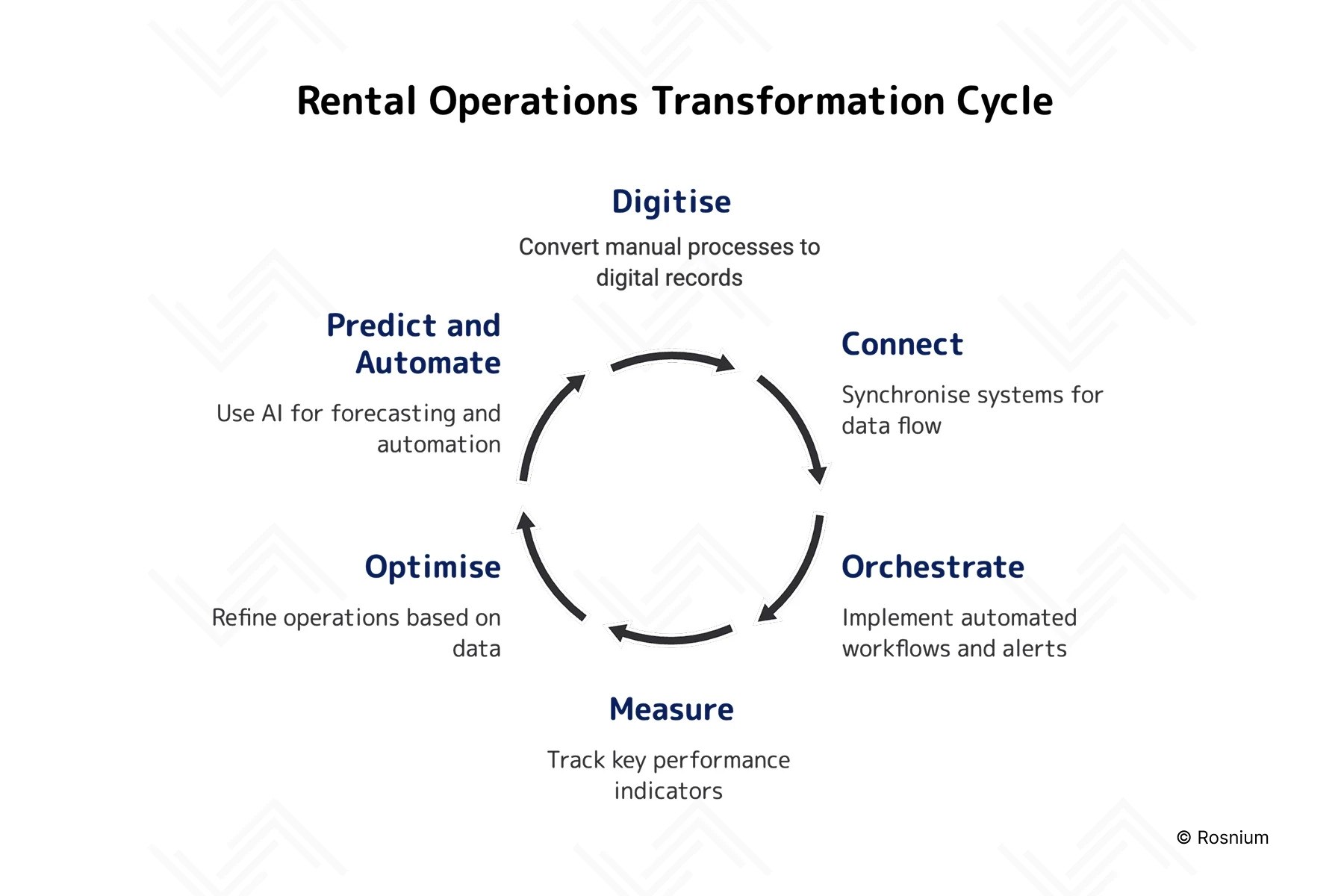
Figure 2: The 6 Stages of Rental Operations Transformation
Build, Buy, Configure or Integrate?
ERA digitalisation report describes several valid routes, including commercial off-the-shelf software, platform partnerships, bespoke development and hybrid combinations. It also notes that a rental solution may replace, integrate with or sit alongside an ERP.
The right route depends on strategic goals, internal capability and the operating model, not on an assumption that one approach is universally superior.
Buy:
Standard Software for Common Processes
Buy when the workflow is common across the sector and is not a source of differentiation.
Buying works best when:
The product represents your asset, pricing, contract and compliance requirements without extensive workarounds.
Implementation speed and established support are more valuable than owning the capability.
The vendor provides reliable APIs, usable exports, audit records and a credible product roadmap.
The total cost and risk of building would exceed the benefit of control.
When a provider solves a mature, specialist problem better than it would be sensible to reproduce internally.
Consider the total operating cost, including user licences, asset limits, premium modules, API access, support and manual workarounds, rather than comparing only the initial subscription price.
Configure:
When Existing System Fit Is Close
Configuration is valuable when it closes the final gap without creating long-term fragility. Configure existing software when it already supports the underlying process and only needs controlled adjustments.
Configuration works best when:
The underlying workflow fits but terminology, permissions, fields, forms or approval rules differ and can be adapted cleanly.
Configuration can be maintained through supported product features.
The organisation can avoid turning configuration into an undocumented custom product.
The configuration remains documented and maintainable.
Avoid configuring a platform so heavily that it becomes a fragile imitation of custom software.
Integrate:
For a Unified Operating View
Integration can deliver more value than replacing a capable system simply to reduce the number of vendors. It is often the most valuable form of custom software development. A purpose-built integration layer can connect ERP, accounting, CRM, fleet, telematics, workshop and transport systems into one rental operating view.
For example:
An off-hire can trigger inspection, maintenance, availability restriction and charge recovery.
A service restriction can prevent an unavailable asset from being promised.
A delivery record can update the contract and billing workflow.
A telematics alert can create a workshop action with the correct asset and customer context.
A late return can trigger communication, extension review and reallocation.
Build:
When the Business Processes are Different
Purpose-built engineering does not have to always mean building a system from scratch or replacing the entire technology estate. The highest-value custom component may be an availability engine, orchestration layer, mobile inspection workflow, customer portal or unified operational view that connects systems already in place.
Purpose-built capabilities often focus on bridging operational gaps:
Customer-facing portals for real-time availability, quoting, and digital documentation.
Mobile depot applications tailored for condition evidence, inspections, and rapid check-in.
Unified orchestration layers that connect contract terms, fleet status, and maintenance windows.
Configurable approval workflows for managing contract extensions, discounts, or asset swaps.
Automated recovery of ancillary revenue, including fuel, cleaning, and damage charges.
Consolidated management dashboards that harmonise commercial, operational, and financial insights.
The objective is not to build more software. It is to remove recurring friction while preserving control over important workflows and data.
A Different Approach: Hybrid
Hybrid approach preserves systems that remain fit for purpose while building the workflow and integration layer required to give operational teams a unified view of rental status, asset readiness and next actions. This avoids unnecessary platform replacement while removing the manual friction created when separate systems do not operate as one lifecycle.
In the hybrid architecture:
Buy when specialist providers offer mature, best-of-breed capabilities.
Configure platforms that align with your standard industry processes.
Integrate systems to ensure essential lifecycle information flows without manual re-keying.
Build the custom workflows and decision logic that define your competitive edge.
For many enterprise operators, the most resilient architecture is a hybrid one.
The principle is not to replace software for its own sake, but to retain and integrate specialist systems that already work well, then build the portals, workflows, operational views and decision logic that are specific to the rental business.
Practical Implications for a Rental Operator
Start with a constraint that is frequent, financially meaningful and narrow enough to test.
A business with slow turnaround should begin with off-hire, inspection, workshop and availability.
A business losing ancillary revenue should prioritise evidence capture and billing.
A multi-site operator with idle assets and lost bookings should focus on demand, location and allocation.
Transformation is not an endless programme of adding features. New functionality should be introduced only when there is a clear business case, such as a measurable operational constraint, a new commercial model, fleet growth, regulatory change or a defined customer need.
The organisation should move from net-new transformation into steady optimisation when the core workflow is consistently adopted, trusted, integrated, measurable and no longer dependent on shadow spreadsheets or a few individuals. At that point, investment should shift towards reliability, security, data quality, user training, support and targeted improvements.
What to Avoid When Selecting Rental Software
1. Feature Checklists Without Process Evidence
A product demonstration can show that a feature exists without proving that it works across your real lifecycle. Test high-risk scenarios using your own asset types, contract rules, branch structure and exceptions.
2. One-Size-Fits-All Workflows
Generic stages may look efficient but force staff into workarounds when the business handles complex assets, mixed commercial models or specialist fulfilment. The workflow should be standardised where possible and deliberately differentiated where necessary.
3. Closed Data and Unclear Ownership
Confirm how data can be exported, integrated, retained and migrated before committing. A system that improves today's workflow but restricts tomorrow's choices can become an expensive constraint.
4. Duplicate Systems of Record
Decide which platform owns each customer, contract, asset, availability status, service event and invoice. Synchronising everything in every direction increases complexity and makes errors harder to diagnose.
5. Brittle Integrations and Manual Workarounds
CSV exports and spreadsheet uploads can be useful during a pilot, but they should not quietly become permanent infrastructure for critical operations. Monitor interfaces, surface failures and define who owns recovery.
6. Automation Without Accountability
Every automated decision needs an owner, rules, an exception route and a success measure. Otherwise automation can accelerate the wrong action or hide problems until they become customer-facing.
7. AI Before the Foundations Are Ready
AI cannot compensate for inconsistent asset identities, missing service records, unreliable statuses or unclear process ownership. Build the connected data and workflow foundation first, then introduce AI where the action, owner and measurable outcome are clear.
Conclusion
A high-value rental management system is not defined by the number of modules it contains. It is defined by whether it gives the business one connected, trusted view of the rental lifecycle and enables teams to turn that visibility into faster, more profitable action. Buy proven capabilities where the work is standard. Integrate systems that remain fit for purpose. Build purposefully where your asset model, commercial logic, workflow or customer experience creates a competitive advantage.